We recently decided to use FluentCart as our eCommerce solution for our product site. The plugin is powerful, fast and handles checkout well, but our design requirements called for a custom pricing form that wasn’t available out of the box. Instead of compromising on the user experience we wanted, we decided to build it ourselves.
This post walks through how we created a custom pricing form that pulls variation data directly from FluentCart’s database tables and renders it as an interactive form on our product pages.
Our Plan
This is the form I want to use on our product landing page. I plan to add more versions later, but this is our starting point. A form where we can showcase both yearly and lifetime pricing with different variations.
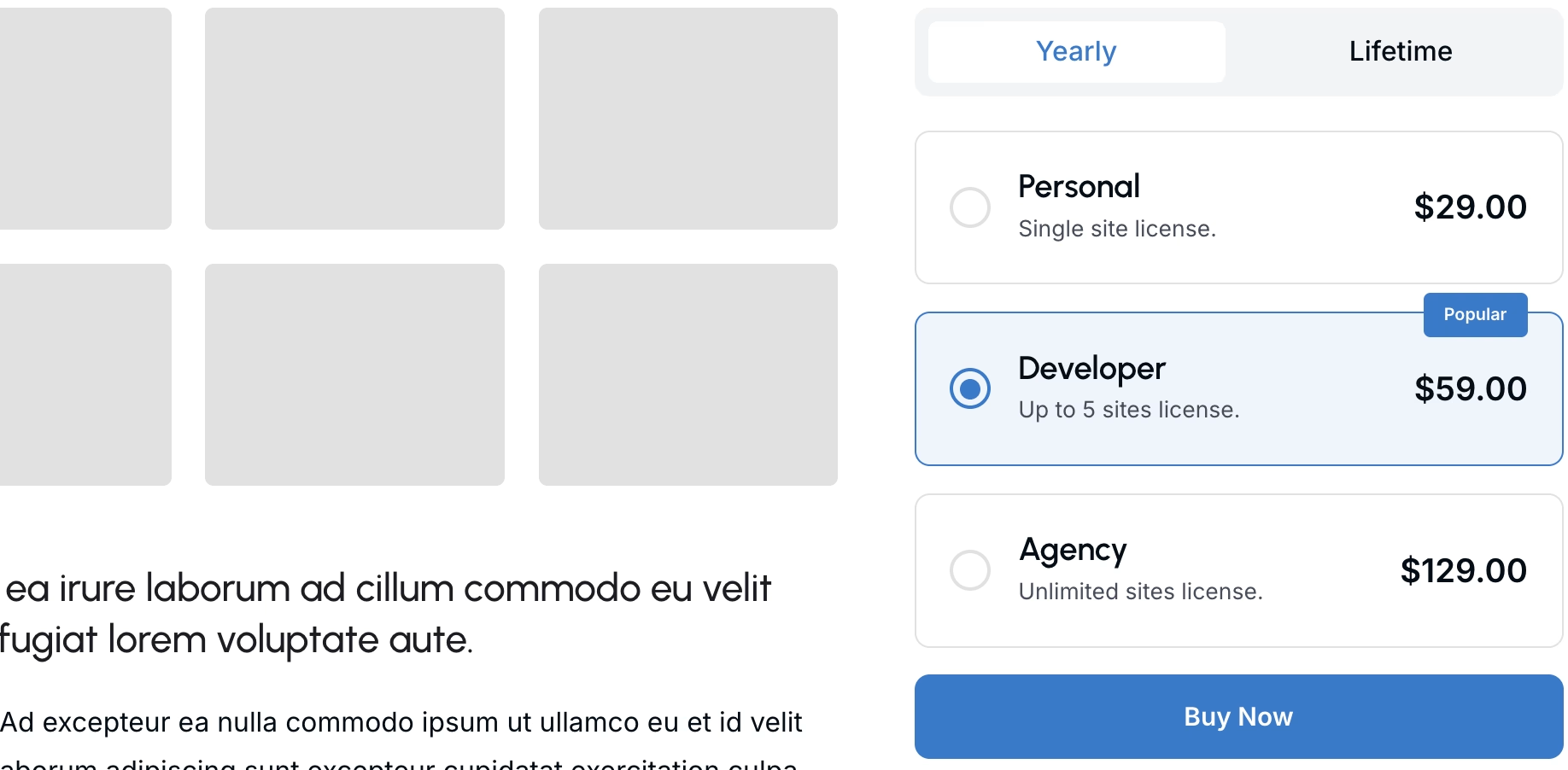
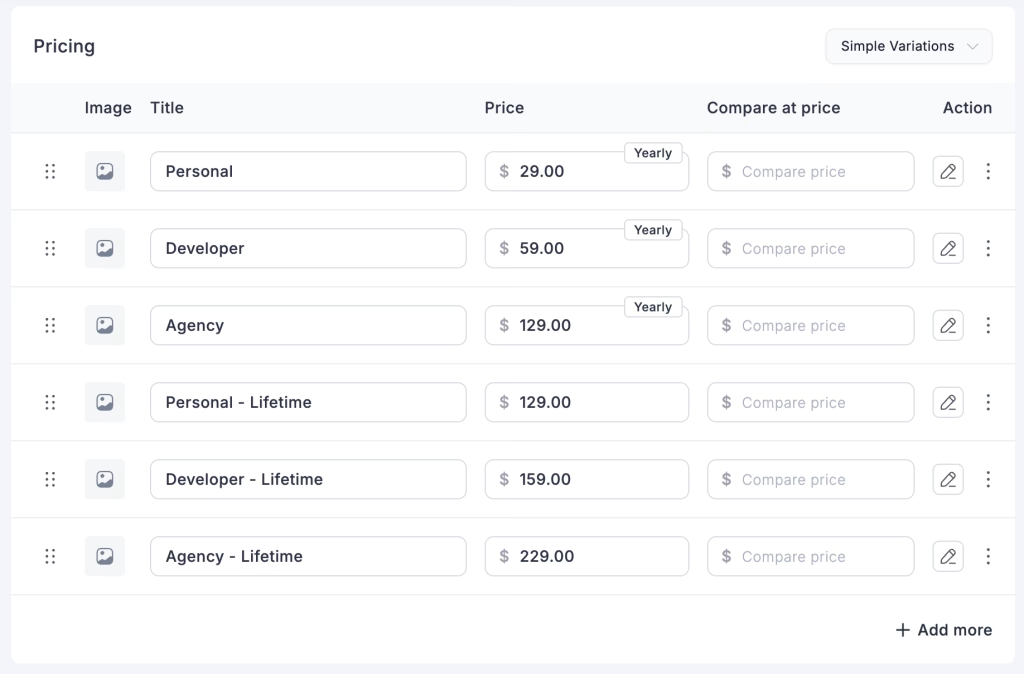
To create this, I will need to add all the applicable variations of the product with title, price and type (subscription or one time). The other thing we need is setting up the product license settings. We will mainly use the activation limit here.
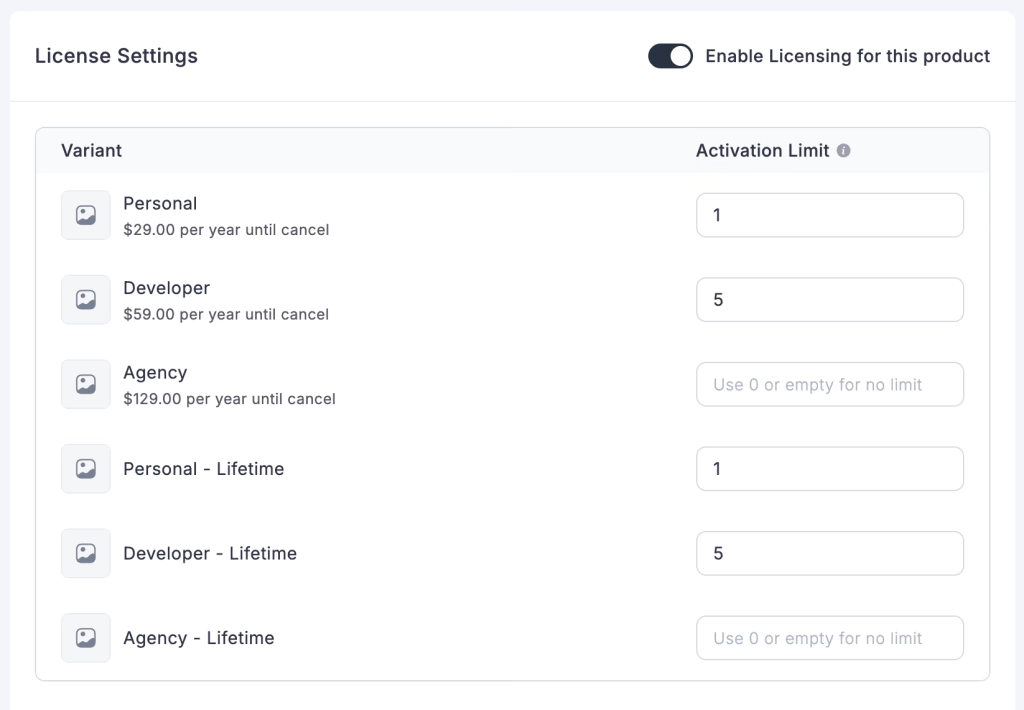
FluentCart stores product variations in custom database tables (fct_product_variations and fct_product_meta), with pricing and license information serialized as JSON.
What I needed was a way to:
- Show yearly and lifetime pricing options with a toggle
- Highlight specific variations (like “Most Popular”)
- Auto-select the best option based on highlights
- Pass the selected variation directly to FluentCart’s instant checkout
The highlights require a custom field. FluentCart supports product custom fields, but the UX isn’t great yet. Hopefully that improves in future releases. In the meantime, I’ve found some workarounds that I may share in a future post.
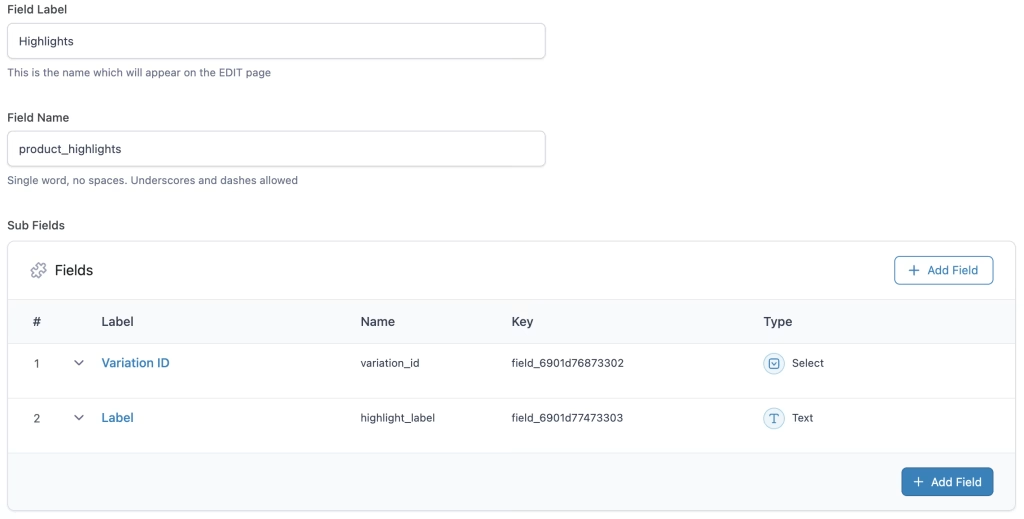
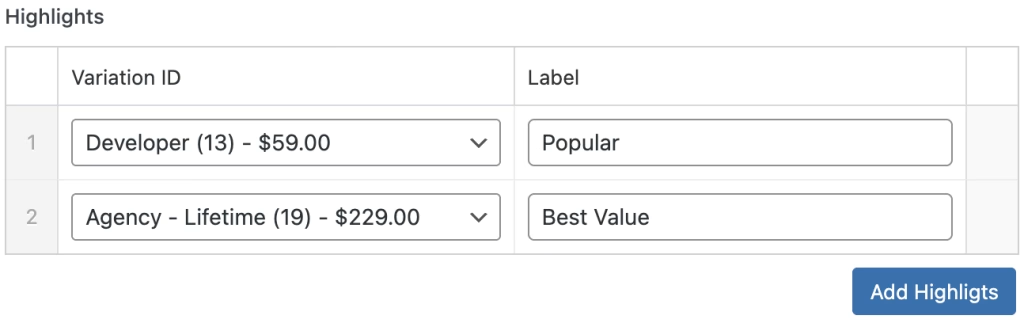
For the custom field, I am going to use ACF (Advanced Custom Fields) plugin as we already use it for other parts of the site. We are going to add a repeater field product_highlights with two sub fields variation_id & highlight_label. The ‘Variation ID’ field is a custom select field. I’ll explain how it works later in this article. These two fields let us choose a product variation and add a label (e.g., ‘Popular,’ ‘Best Choice’).
Heads up: the FluentCart developer docs are still being updated. Our current approach might not age well, so give the docs a quick check for the latest guidance before you dive in.
Database Structure Overview
Before diving into code, it helps to understand FluentCart’s data structure. Product variations live in two main tables:
fct_product_variations – Stores basic variation info:
id– Variation IDproduct_id– Parent product IDtitle– Variation nameprice– Price in cents
fct_product_meta – Stores additional metadata as serialized arrays:
license_settings– JSON object with license limits and validity periods- Other custom meta fields
The license_settings field is particularly important since it contains the licensing rules for each variation.
Building the Data Retrieval Function
First, we need a function to query and structure this data. Here’s the complete implementation:
/**
 * Get all available variations for a product with license settings
 *
 * @param int $product_id The product post ID
 * @return array|false Array of variations with details or false on failure
 */
function wd_fct_get_product_variations( $product_id ) {
    global $wpdb;

    // Sanitize product ID
    $product_id = absint( $product_id );

    if ( ! $product_id ) {
        return false;
    }

    // Get active variations from fct_product_variations
    $variations = $wpdb->get_results( $wpdb->prepare(
        "SELECT id, item_price, payment_type, variation_title
        FROM {$wpdb->prefix}fct_product_variations
        WHERE post_id = %d
        AND item_status = 'active'
        ORDER BY item_price ASC",
        $product_id
    ), ARRAY_A );

    if ( empty( $variations ) ) {
        return array();
    }

    // Get license settings from fct_product_meta
    $license_settings = $wpdb->get_var( $wpdb->prepare(
        "SELECT meta_value
        FROM {$wpdb->prefix}fct_product_meta
        WHERE object_id = %d
        AND meta_key = 'license_settings'
        LIMIT 1",
        $product_id
    ) );

    // Parse license settings
    $license_data = array();
    if ( $license_settings ) {
        $decoded = json_decode( $license_settings, true );
        if ( json_last_error() === JSON_ERROR_NONE && isset( $decoded['variations'] ) ) {
            $license_data = $decoded['variations'];
        }
    }


    // Get variation highlights from ACF
    $highlights_data = array();
    if ( function_exists( 'have_rows' ) && have_rows( 'product_highlights', $product_id ) ) {
        while ( have_rows( 'product_highlights', $product_id ) ) {
            the_row();
            $variation_id = get_sub_field( 'variation_id' );
            $highlight_label = get_sub_field( 'highlight_label' );

            if ( $variation_id && $highlight_label ) {
                $highlights_data[ $variation_id ] = $highlight_label;
            }
        }
    }

    // Merge variation data with license settings and highlights
    $result = array();
    foreach ( $variations as $variation ) {
        $variation_id = $variation['id'];

        $result[] = array(
            'id'                => $variation_id,
            'title'             => $variation['variation_title'],
            'item_price'        => $variation['item_price'],
            'payment_type'      => $variation['payment_type'],
            'activation_limit'  => isset( $license_data[ $variation_id ]['activation_limit'] )
                                    ? $license_data[ $variation_id ]['activation_limit']
                                    : '',
            'validity_unit'     => isset( $license_data[ $variation_id ]['validity']['unit'] )
                                    ? $license_data[ $variation_id ]['validity']['unit']
                                    : '',
            'validity_value'    => isset( $license_data[ $variation_id ]['validity']['value'] )
                                    ? $license_data[ $variation_id ]['validity']['value']
                                    : '',
            'highlight_label'   => isset( $highlights_data[ $variation_id ] )
                                    ? $highlights_data[ $variation_id ]
                                    : ''
        );
    }

    return $result;
}Code language: PHP (php)
Creating the Form Shortcode
Next, we need a shortcode to render the form. I may extend this into a Bricks Builder element in future. Let me know if you would like to see that too!
/**
 * Generate product variation form HTML
 *
 * @param int $product_id The product post ID
 * @param array $args Configuration arguments
 * @return string HTML output
 */
function wd_fct_product_form( $product_id, $args = array() ) {

    // Default arguments
    $defaults = array(
        'button_text'          => 'Buy Now',
        'currency_symbol'      => '$',
        'show_yearly_lifetime' => true, // Show yearly/lifetime toggle
        'default_type'         => 'year', // 'year' or 'lifetime'
    );

    $args = wp_parse_args( $args, $defaults );

    // Get variations
    $variations = wd_fct_get_product_variations( $product_id );

    if ( empty( $variations ) ) {
        return '<p>No variations available.</p>';
    }

    // Group variations by validity unit (year/lifetime)
    $grouped = array(
        'year'     => array(),
        'lifetime' => array()
    );

    foreach ( $variations as $variation ) {
        $unit = $variation['validity_unit'];
        if ( isset( $grouped[ $unit ] ) ) {
            $grouped[ $unit ][] = $variation;
        }
    }

    // Generate unique ID for this form
    $form_id = 'wd-fct-form-' . $product_id . '-' . uniqid();

    ob_start();
    ?>

    <div class="wd-fct-product-form" id="<?php echo esc_attr( $form_id ); ?>">

        <?php if ( $args['show_yearly_lifetime'] && ! empty( $grouped['year'] ) && ! empty( $grouped['lifetime'] ) ) : ?>
        <div class="wd-fct-type-toggle">
            <button type="button" class="wd-fct-type-btn <?php echo $args['default_type'] === 'year' ? 'active' : ''; ?>" data-type="year">
                Yearly
            </button>
            <button type="button" class="wd-fct-type-btn <?php echo $args['default_type'] === 'lifetime' ? 'active' : ''; ?>" data-type="lifetime">
                Lifetime
            </button>
        </div>
        <?php endif; ?>

        <?php foreach ( $grouped as $type => $type_variations ) : ?>
            <?php if ( empty( $type_variations ) ) continue; ?>

            <div class="wd-fct-variations" data-type="<?php echo esc_attr( $type ); ?>" <?php echo $args['default_type'] === $type ? 'style="display: block;"' : ''; ?>>

                <?php foreach ( $type_variations as $variation ) : ?>
                    <?php
                    $has_highlight = ! empty( $variation['highlight_label'] );

                    // Generate description
                    $description = '';
                    if ( ! empty( $variation['activation_limit'] ) ) {
                        if ( $variation['activation_limit'] == 1 ) {
                            $description = 'Single site license.';
                        } else {
                            $description = 'Up to ' . $variation['activation_limit'] . ' sites license.';
                        }
                    } else {
                        $description = 'Unlimited sites license.';
                    }
                    ?>

                    <div class="wd-fct-variation <?php echo $has_highlight ? 'highlighted' : ''; ?>"
                         data-variation-id="<?php echo esc_attr( $variation['id'] ); ?>"
                         data-price="<?php echo esc_attr( $variation['item_price'] ); ?>">

                        <?php if ( $has_highlight ) : ?>
                        <span class="wd-fct-highlight-badge"><?php echo esc_html( $variation['highlight_label'] ); ?></span>
                        <?php endif; ?>

                        <div class="wd-fct-variation-content">
                            <div class="wd-fct-radio"></div>

                            <div class="wd-fct-variation-info">
                                <h3 class="wd-fct-variation-title"><?php echo esc_html( $variation['title'] ); ?></h3>
                                <p class="wd-fct-variation-desc"><?php echo esc_html( $description ); ?></p>
                            </div>

                            <div class="wd-fct-variation-price">
                                <?php echo esc_html( $args['currency_symbol'] . number_format( $variation['item_price'] / 100, 2 ) ); ?>
                            </div>
                        </div>
                    </div>

                <?php endforeach; ?>

            </div>

        <?php endforeach; ?>

        <button type="button" class="wd-fct-buy-btn" disabled>
            <?php echo esc_html( $args['button_text'] ); ?>
        </button>

    </div>
<?php
    return ob_get_clean();
}

/**
 * Shortcode for product form
 *
 * Usage examples:
 * [fct_product_form product_id="123"]
 * [fct_product_form product_id="123" button_text="Purchase Now"]
 * [fct_product_form product_id="123" default_type="lifetime"]
 */
function wd_fct_product_form_shortcode( $atts ) {
    $atts = shortcode_atts( array(
        'product_id'    => 0,
        'button_text'   => 'Buy Now',
        'currency'      => '$',
        'show_toggle'   => 'yes',
        'default_type'  => 'year',
    ), $atts );

    $product_id = absint( $atts['product_id'] );

    if ( ! $product_id ) {
        return '<p>Product ID is required.</p>';
    }

    $args = array(
        'button_text'          => sanitize_text_field( $atts['button_text'] ),
        'currency_symbol'      => sanitize_text_field( $atts['currency'] ),
        'show_yearly_lifetime' => $atts['show_toggle'] === 'yes',
        'default_type'         => in_array( $atts['default_type'], array( 'year', 'lifetime' ) ) ? $atts['default_type'] : 'year',
    );

    return wd_fct_product_form( $product_id, $args );
}
add_shortcode( 'fct_product_form', 'wd_fct_product_form_shortcode' );Code language: JavaScript (javascript)
Dynamically Populate ACF Field
Now we need to work on the ACF repeater field we added. To make it easier to select the variation we want to highlight, we need to populate the select field dynamically using the following function.
/**
 * Populate ACF select field with product variations
 */
function acf_load_variation_choices( $field ) {
    global $wpdb;

    // Reset choices
    $field['choices'] = array();

    // Get the current post ID
    $post_id = 0;

    // Try to get post ID from various contexts
    if ( isset( $_GET['post'] ) ) {
        $post_id = absint( $_GET['post'] );
    } elseif ( isset( $_POST['post_ID'] ) ) {
        $post_id = absint( $_POST['post_ID'] );
    } elseif ( isset( $_POST['post_id'] ) ) {
        $post_id = absint( $_POST['post_id'] );
    } elseif ( function_exists( 'get_the_ID' ) ) {
        $post_id = get_the_ID();
    }

    // If we have a post ID, get its variations
    if ( $post_id ) {
        $variations = $wpdb->get_results( $wpdb->prepare(
            "SELECT id, variation_title, item_price
            FROM {$wpdb->prefix}fct_product_variations
            WHERE post_id = %d
            AND item_status = 'active'
            ORDER BY item_price ASC",
            $post_id
        ), ARRAY_A );

        if ( ! empty( $variations ) ) {
            foreach ( $variations as $variation ) {
                $price = number_format( $variation['item_price'] / 100, 2 );
                $label = $variation['variation_title'] . ' (' . $variation['id'] . ') - $' . $price;
                $field['choices'][ $variation['id'] ] = $label;
            }
        }
    }

    // If no variations found, add a placeholder
    if ( empty( $field['choices'] ) ) {
        $field['choices'][''] = 'No variations found for this product';
    }

    return $field;
}

// Hook into ACF using the specific field key (Change this key! I am using mine)
add_filter('acf/load_field/key=field_6901d76873302', 'acf_load_variation_choices');Code language: PHP (php)
This will make setting up highlight much easier!
Styling the Form
For the CSS I tried to use more variables so it is easier to customize. You can easily use the variables to make it work for your branding.
.wd-fct-product-form {
    --fct-primary-color: #0066ff;
    --fct-highlight-bg: #0066ff;
    --fct-highlight-text: #ffffff;
    --fct-border-color: #e5e7eb;
    --fct-text-color: #111827;
    --fct-secondary-text: #6b7280;
    --fct-toggle-bg: #f9fafb;
    --fct-base-font-size: 16px;
    --fct-title-font-size: 24px;
    --fct-price-font-size: 28px;

    max-width: 700px;
    margin: 0 auto;
    font-size: var(--fct-base-font-size, 16px);
}

.wd-fct-type-toggle {
    display: flex;
    gap: 16px;
    margin-bottom: 24px;
    background: var(--fct-toggle-bg, #f9fafb);
    padding: 8px;
    border-radius: 12px;
}

.wd-fct-type-btn {
    flex: 1;
    padding: 12px 24px;
    background: transparent;
    border: none;
    border-radius: 8px;
    font-size: var(--fct-base-font-size, 16px);
    font-weight: 600;
    color: var(--fct-text-color, #111827);
    cursor: pointer;
    transition: all 0.2s ease;
}

.wd-fct-type-btn.active {
    background: var(--fct-primary-color, #0066ff);
    color: white;
}

.wd-fct-variations {
    display: none;
}

.wd-fct-variations.active {
    display: block;
}

.wd-fct-variation {
    position: relative;
    border: 2px solid var(--fct-border-color, #e5e7eb);
    border-radius: 12px;
    padding: 24px;
    margin-bottom: 16px;
    cursor: pointer;
    transition: all 0.2s ease;
}

.wd-fct-variation:hover {
    border-color: var(--fct-primary-color, #0066ff);
}

.wd-fct-variation.highlighted {
    border-color: var(--fct-highlight-bg, #0066ff);
    border-width: 2px;
}

.wd-fct-variation.selected {
    border-color: var(--fct-primary-color, #0066ff);
    background: color-mix(in srgb, var(--fct-primary-color, #0066ff) 8%, transparent);
}

.wd-fct-highlight-badge {
    position: absolute;
    top: -12px;
    right: 20px;
    background: var(--fct-highlight-bg, #0066ff);
    color: var(--fct-highlight-text, #ffffff);
    padding: 4px 12px;
    border-radius: 6px;
    font-size: calc(var(--fct-base-font-size, 16px) * 0.75);
    font-weight: 600;
}

.wd-fct-variation-content {
    display: flex;
    align-items: center;
    gap: 16px;
}

.wd-fct-radio {
    width: 24px;
    height: 24px;
    border: 2px solid var(--fct-border-color, #e5e7eb);
    border-radius: 50%;
    position: relative;
    flex-shrink: 0;
}

.wd-fct-variation.selected .wd-fct-radio {
    border-color: var(--fct-primary-color, #0066ff);
}

.wd-fct-variation.selected .wd-fct-radio::after {
    content: '';
    position: absolute;
    top: 50%;
    left: 50%;
    transform: translate(-50%, -50%);
    width: 12px;
    height: 12px;
    background: var(--fct-primary-color, #0066ff);
    border-radius: 50%;
}

.wd-fct-variation-info {
    flex: 1;
}

.wd-fct-variation-title {
    font-size: var(--fct-title-font-size, 24px);
    font-weight: 700;
    color: var(--fct-text-color, #111827);
    margin: 0 0 4px 0;
}

.wd-fct-variation-desc {
    font-size: var(--fct-base-font-size, 16px);
    color: var(--fct-secondary-text, #6b7280);
    margin: 0;
}

.wd-fct-variation-price {
    font-size: var(--fct-price-font-size, 28px);
    font-weight: 700;
    color: var(--fct-text-color, #111827);
    flex-shrink: 0;
}

.wd-fct-buy-btn {
    width: 100%;
    padding: 16px 32px;
    background: var(--fct-primary-color, #0066ff);
    color: white;
    border: none;
    border-radius: 12px;
    font-size: calc(var(--fct-base-font-size, 16px) * 1.125);
    font-weight: 600;
    cursor: pointer;
    transition: all 0.2s ease;
    margin-top: 8px;
}

.wd-fct-buy-btn:hover {
    opacity: 0.9;
    transform: translateY(-1px);
}

.wd-fct-buy-btn:disabled {
    opacity: 0.5;
    cursor: not-allowed;
    transform: none;
}Code language: CSS (css)
Adding JavaScript Functionality
Finally, we need JavaScript to handle the toggle between yearly and lifetime plans, and to redirect to FluentCart checkout:
(function() {
    const form = document.getElementById('<?php echo esc_js( $form_id ); ?>');
    const typeButtons = form.querySelectorAll('.wd-fct-type-btn');
    const variationGroups = form.querySelectorAll('.wd-fct-variations');
    const variations = form.querySelectorAll('.wd-fct-variation');
    const buyButton = form.querySelector('.wd-fct-buy-btn');

    let selectedVariationId = null;

    // Function to select first variation in active group (prioritize highlighted)
    function selectFirstVariation() {
        const activeGroup = form.querySelector('.wd-fct-variations.active, .wd-fct-variations[style*="display: block"]');
        if (activeGroup) {
            // First try to find a highlighted variation
            let firstVariation = activeGroup.querySelector('.wd-fct-variation.highlighted');

            // If no highlighted variation, get the first one
            if (!firstVariation) {
                firstVariation = activeGroup.querySelector('.wd-fct-variation');
            }

            if (firstVariation) {
                // Remove selected class from all variations
                variations.forEach(v => v.classList.remove('selected'));

                // Select the variation
                firstVariation.classList.add('selected');
                selectedVariationId = firstVariation.dataset.variationId;
                buyButton.disabled = false;
            }
        }
    }

    // Type toggle functionality
    typeButtons.forEach(button => {
        button.addEventListener('click', function() {
            const type = this.dataset.type;

            // Update active button
            typeButtons.forEach(btn => btn.classList.remove('active'));
            this.classList.add('active');

            // Show corresponding variations
            variationGroups.forEach(group => {
                if (group.dataset.type === type) {
                    group.classList.add('active');
                    group.style.display = 'block';
                } else {
                    group.classList.remove('active');
                    group.style.display = 'none';
                }
            });

            // Select first variation in newly active group (prioritize highlighted)
            selectFirstVariation();
        });
    });

    // Variation selection
    variations.forEach(variation => {
        variation.addEventListener('click', function() {
            // Remove selected class from all variations
            variations.forEach(v => v.classList.remove('selected'));

            // Add selected class to clicked variation
            this.classList.add('selected');

            // Store selected variation ID
            selectedVariationId = this.dataset.variationId;

            // Enable buy button
            buyButton.disabled = false;
        });
    });

    // Buy button click - redirect to FluentCart checkout
    buyButton.addEventListener('click', function() {
        if (selectedVariationId) {
            const checkoutUrl = '<?php echo esc_js( home_url( '/' ) ); ?>?fluent-cart=instant_checkout&item_id=' + selectedVariationId + '&quantity=1';
            window.location.href = checkoutUrl;
        }
    });

    // Auto-select first variation on page load (prioritize highlighted)
    selectFirstVariation();
})();Code language: JavaScript (javascript)
Implementation Steps
To use this on your site:
- Add the PHP functions to your theme’s
functions.phpor a custom plugin - Add the CSS to your theme stylesheet or enqueue it to the single product page
- Include the JavaScript in your theme or enqueue it properly
- Create new product(s) using the FluentCart plugin
- Set pricing & license setting
- Set up ACF fields for variation highlights on your product post type
- Use the shortcode on your product page template or anywhere on the site.
Some examples:
[fct_product_form product_id=”123″]
[fct_product_form product_id=”123″ button_text=”Purchase Now”]
[fct_product_form product_id=”123″ default_type=”lifetime”]
The Final Output
With this setup, we control exactly how digital product variations show up. More improvments will be made as we move forward in development of our site (a11y, using rest api etc). I’m diving deeper into FluentCart, so check back for more ideas. Got thoughts? Drop a comment!